Pixel Precision with Diagnostic CSS

August 26th, 2008

categories
code collection, css
tags
, , ,

Here’s a little CSS trick I started using a while ago that has really helped me to achieve pixel precision when converting Photoshop PSD (or Fireworks PNG or whatever) design comps into (X)HTML and CSS web standards goodness.

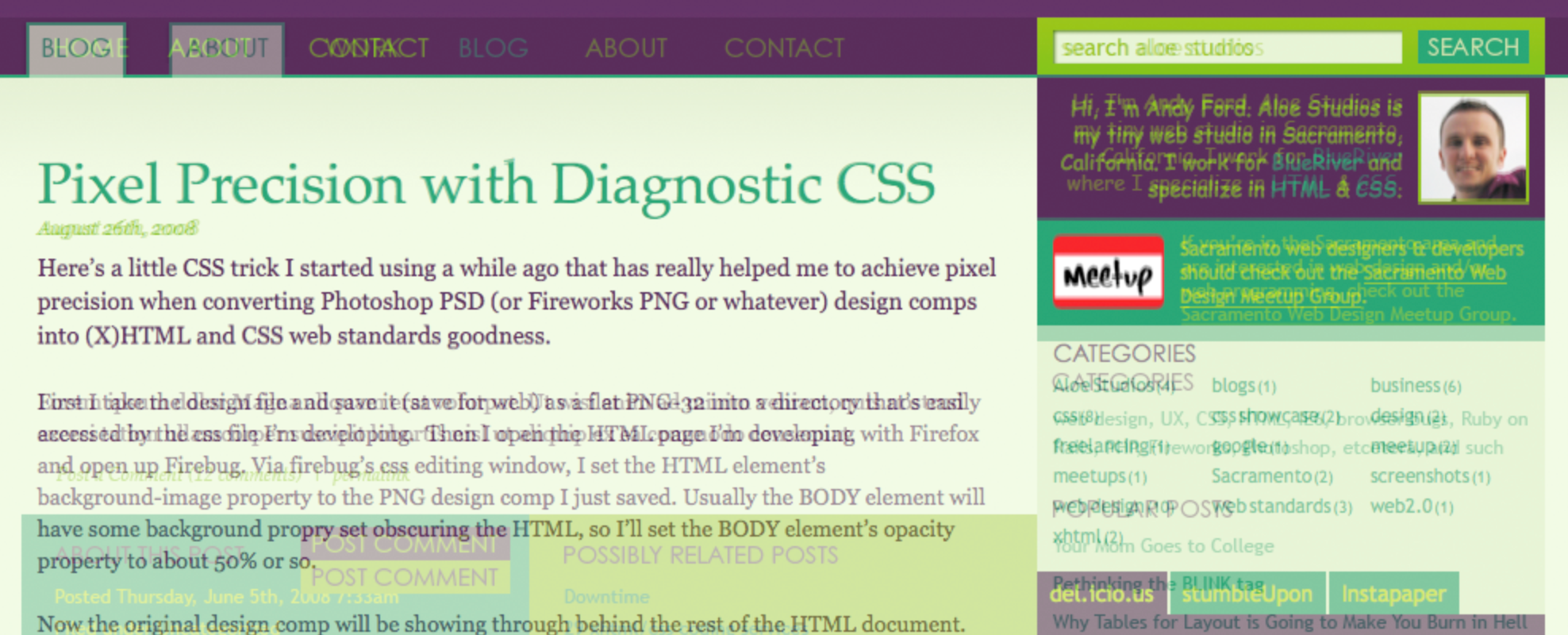
The idea is to take the page you’re developing in HTML and CSS and overlay it on top of the design mockup you’re working from. And you can do this inside of any browser. The idea borrows upon the spirit of “Diagnostic Styling” evangelized by Eric Meyer (1) (2) by using a few extra classes.

First I take the design file and save it (save for web) as a flat PNG-32 (or 24) into a directory that’s easily accessed by the css file I’m developing.  Then I open the HTML page I’m developing with Firefox and open up Firebug. Via Firebug’s CSS editing window, I set the HTML element’s background-image property to the PNG design comp I just saved. Usually the BODY element will have some background property set that will obscure the HTML element, so I’ll set the BODY element’s opacity property to about 50% or so.

Now the original design comp will be showing through behind the rest of the HTML document.

To streamline the process a bit, I’ve created these CSS rules which can be dropped into any site’s CSS file:

html.bg { background-position: 50% 0; background-repeat: no-repeat; }
html.bg body { filter:alpha(opacity=70); opacity: .7; }

And on a more per-project basis

html.bg-home { background-image: url(../img/mockup-home.png); }
html.bg-about { background-image: url(../img/mockup-about.png); }

You can try it right now on this site by adding the “bg” and “bg-home” classes to the HTML element using Firebug.  As you can see, there’s a lot on my site that doesn’t really line up so well with my mockup (since this is my personal site, I’ve made quite a few adjustments in the CSS rather than going back to Photoshop). But I think it serves as a pretty good example since there are some things that do line perfectly and plenty that don’t.

Benefits

This technique will work in just about any browser. Just add the classes to the HTML element in your markup and you’ve got your mockup in the background. Having the mockup in the background also means that link rollovers stay intact. And you can still use Firebug as you normally would.

Caveats

IE 6 and 7 have some issues with the opacity filter and positioning so all elements may not be transparent.

Also, since this technique uses the HTML element to display the mockup as a background image, that means it will override any background you may have already set on the HTML element. Personally I probably only set backgrounds on the HTML element about 50-60% of the time and they’re usually pretty not too complex. I don’t see this as being much of a drawback, but it is worth stating.

Why not just use Pixel Perfect or OverlayComp?

If you haven’t seen it, there’s a really cool tool for Firefox called Pixel Perfect (more specifically, it’s a plugin for the Firebug extension) which allows you to overlay a design comp over the top of a web page you’re viewing in Firefox. This is an ingenious tool and I tip my hat to the Pixel Perfect developers.

What I personally don’t like about Pixel Perfect is that it adds the image file on top of everything effectively disabling your ability to use Firebug for on-page CSS editing. The demo video on their site looks like someone is actually using Firebug while an overlay is present, but I was never not able to get that to work at first because I had the “Hide overlay when inspecting” option turned on (Thanks to Pixel Perfect developer Mike Buckley for setting me straight). So, like OverlayComp, inspecting elements is still very possible – just not accessible via right clicking on the web page. Also, it’s It is a Firebug plugin, so Firefox is the one and only browser it works in.

OverlayComp works similarly to Pixel Perfect in that it places your image over the top of the html. Inspecting elements in Firebug is still possible – just a little extra work. It requires adding javascript directly to your page with a script element, but it does work in all browsers.

At the end of the day, you’ve got to use the tool that works best for you.  I’d love to know how other CSS developers are approaching this and if there are any other tools available for this kind of thing.

Comments, Quips & Protestations

  1. 1 August 27, 2008 6:29 am Nacho

    Hi. Why don’t you use this instead:
    http://www.pixelperfectplugin.com/

    :)

  2. 2 August 27, 2008 7:22 am Andy Ford

    @Nacho – I dedicated two paragraphs to Pixel Perfect in the article. One of which discusses why I personally don’t like using it.

  3. 3 August 27, 2008 9:10 am Mike

    Hi there,
    I am the developer of the Pixel Perfect extension. First off, great post. Thanks for the kind words. Have you tried to use the “hide overlay when inspecting” option? This hides the overlay when using other firebug tabs, allowing you to access any elements.

    Can you recommend a better way to have the overlay appear, and still without preventing inspection with Firebug? Would love to get some feedback.

    Cheers

  4. 4 August 27, 2008 9:21 am Mark Aplet

    Andy, that sounds like a huge time saver. I will give it a try this week when I start cutting up our new company site for Page Design. I used Pixel Perfect but never got into it. Not sure why, maybe just lazy??? I was going to suggest it until I read the rest of your article.

    I use a similar technique myself but your is much better. I placed an extra div at the end of a page just before the closing /HTML tag. Then placed my transparent png over my design with absolute positioning. I think your way would be better. I am excited to try it out. Great article!

  5. 5 August 27, 2008 10:04 am Andy Ford

    @Mike
    Thanks for checking in. I hope I didn’t come across as throwing Pixel Perfect under the bus. I must have had the “hide overlay when inspecting” option turned on. It’s making more sense now! Since the overlay is on top of everything, I can’t right click and “Inspect Element” directly, but I can still navigate to elements in the inspection window, so that’s great. I’ve edited my post to reflect your input.

    I can understand why Pixel Perfect and OverlayComp both work the way they do in putting the image on the very top of everything. Getting it underneath would be too unreliable as a “one size fits all” solution.

    Perhaps a possible feature that could be added to PixelPerfect would be an option to allow the user to insert the overlay as more of an underlay similar to the technique I’ve propose in this article. Then the user could choose between “overlay” and “underlay” options.

    One feature I would really love to see added to PixelPerfect is the ability to position the overlay with percentages. Currently you can position the overlay using the form inputs or drag and drop (which is greatly appreciated!) But when you resize the browser, you have to reposition the overlay.

    While I have your ear, here’s a crazy thought… I’m not very good with javascript, so I don’t know how feasible this is. But I’m wondering if it would be possible to keep the Pixel Perfect stacking order the same (web page on bottom, overlay on top), and then add a cloned version of the web page on top of the overlay with all elements set to “visibility:hidden” and then somehow map the mouse interactions with the hidden top layer down to the bottom layer so hover interactions still work and the right click “inspect element” could still work…

    Like I said – I don’t know if that’s feasible. I’m thinking that would probably take massive effort for little reward, but I’d be interested to get your thoughts on that idea.

  6. 6 August 27, 2008 10:16 am Andy Ford

    @Mark
    I’ve done the extra div thing before and it is certainly better than nothing. But in this post-Firebug world, I wanted something that could be done with class attributes alone. Just in case you missed it, you can see it in action right here on this site by adding the “bg” and “bg-home” classes to the HTML element via Firebug (You’ll have to scroll to the top of the page since the mockup is only so tall). It’s mess, but I think it proves the point.

  7. Pingback: Pixel Precision with Diagnostic CSS | CrazyLeaf Design Blog

  8. Pingback: Fatih Hayrio?lu'nun not defteri » 03 Eylül Web’den seçme haberler » Hasan, Yalç?n, yenilemi?, Hay?rl?, Ba?lant??, yaz?, gömme, i?leri, üzerine, baya??

  9. Pingback: OPC Toolbox » Blog Archive » Pixel Precision with Diagnostic CSS

  10. Pingback: Curtis Carmichael’s Professional Web Marketing Site » Blog Archive » Pixel Perfect Web Design

  11. 7 October 1, 2008 1:51 pm Tim Wright

    This is a very cool idea. Thanks for sharing

  12. 8 October 11, 2008 4:18 pm John Allsopp

    Hi Andy,

    have you looked at XRAY?

    http://westciv.com/xray

    It’s also hackable, so you might be able to adapt it to meet your needs.

    j

  13. 9 October 12, 2008 8:57 am Andy Ford

    John,
    I have seen XRAY. Pretty cool, but I’m so used to Firebug as my main HTML/CSS debugging companion that XRAY hasn’t made it into my workflow (but I’ll be giving it another go for sure!)

    Can XRAY be used to edit CSS a la Firebug? What language would I be hacking in – JavaScript?

    thanks!

  14. 10 October 13, 2008 6:35 am Alex

    i think firefox is better then IE 7 or 8. thanks for your message

  15. Pingback: CSSKarma.com » This Week in Links 10/15

  16. 11 December 4, 2008 6:17 pm Peter Anselmo

    Good post Andy. I usually just line up the upper left corners of my browser and Photoshop file, and re-size my browser window to check if everything lines up. This is obviously a much more accurate method

  17. Pingback: 6 CSS diagnostic resources for every Web developer’s toolbox « Seb2.0

  18. 12 June 16, 2010 8:35 pm jitendra vyas

    I liked your solution. I use pixel-perfect in Firefox but your solution is very good to match perfection in IE.

  19. Pingback: Anonymous

  20. 13 October 19, 2011 8:28 am Newbie Drewbie

    Hi Andy,

    so 3 years have passed since this post, I wanted to ask what your preferred method is these days? Are you still using this technique? I’d appreciate your reply.

    Greets,

  21. 14 October 19, 2011 2:10 pm Andy Ford

    @Newbie Drewbie – I do still use this method quite a bit. I’ve thrown together a little PHP-based microframework that I use when creating static HTML/CSS/JS template deliverables. One of its features is you can add a URL query string like ?underlay=home and the background underlay is done dynamically. I really need to put my microframework on GitHub.

    More and more, I’m working on responsive sites with fluid widths. So during development I’ll temporarily center and set the width of the site to match the static mockup. Something like:
    body { width: 972px; margin: 0 auto; }

Post a Comment

Your email address will not be published. Required fields are marked *

*