Saying Goodbye to the overflow: hidden Clearing Hack

December 10th, 2009

categories
css
tags
, , , ,

I’ve been thinking of this for a while now, and it’s finally time to part ways with the overflow: hidden (and overflow: auto) clearing hack. Jeff Starr’s recent and excellent post – The New Clearfix Method – and the ensuing comments were enough to finally prompt me to write about it here. (And since I started writing this, Jonathan Snook has started a Twitter dialog about overflow vs. clearfix).

While the clearfix method is a tried and true hack, I’ve always disliked muddying up my HTML markup with crufty “clearfix” classes strewn about. So I ended up using overflow: hidden as much as I could. But overflow: hidden is not without its drawbacks. Although there is no extra class to apply in the HTML (win!), there may be situations when you want to have child elements positioned partially (or entirely) outside of their overflow: hidden wielding parent (or other ancestor) container. In these cases, the container with overflow: hidden will clip the element that you’re trying to partially (or entirely) position outside of it. (Case in point: If you use suckerfish dropdowns, try setting overflow: hidden on the outermost list).

So although overflow: hidden is not usable in all situations, I used to prefer it over using the “clearfix” class method. But in reality I ended up with both: I had overflow: hidden where I could get away with it, and “clearfix” classes where I couldn’t use overflow: hidden. It bothered me a bit to mix and match two different clearing methods, but I was happy to have fewer “clearfix” classes violating my otherwise semantic markup Kumbaya festival.

Then in his presentation at An Event Apart 2008 in San Francisco, Dan Cederholm suggest using the class name “group” rather than “clearfix” – a suggestion which later made it into his book Handcrafted CSS. It’s a minor thing, but I do like the improved semantics (in most cases) of the “group” class name over the “clearfix” class name, so I adopted this approach and felt okay about using it as a fallback when overflow: hidden wasn’t feasible.

In his talk and in his book, Cederholm also walks through the “big long list” idea of applying the rules for the clearfix (renamed to “group”) class directly to the selectors that need them in the CSS.
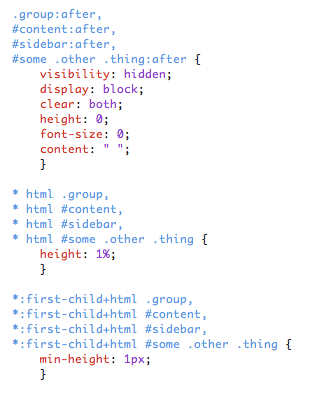
Big Long List

This keeps the HTML more pure while avoiding the drawbacks of overflow – a total win-win. But it does mean extra bloat in the CSS. Probably okay for smaller sites, but it can quickly get unruly with larger sites. I tried this approach on a few projects and decided the CSS bloat was indeed too much, so I stuck with the mix of overflow: hidden and the “group” class.

The Catalyst

But I’m now saying goodbye to overflow: hidden and the deciding factor for me is CSS3. Specifically box-shadow. At least in the sense that box-shadow was the first property I noticed being negatively impacted by the use of overflow: hidden. Like the positioned child elements mentioned above, box-shadow can get clipped when the parent (or other ancestor) element has overflow applied.

And there are several other things to consider as we move forward using more CSS3. Text-shadow and transform can also potentially be clipped by overflow: hidden (see the demo).
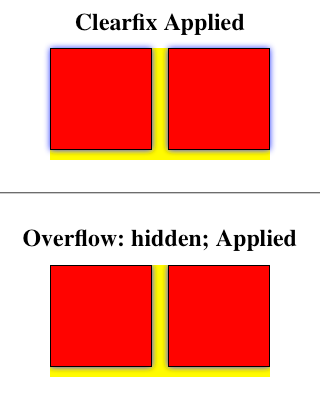
Example of overflow:hidden clipping a box-shadow

As we rely more and more on CSS3 properties we can rely less and less on overflow as a clearing method. So I’ll be abandoning overflow and relying upon clearfix (Jeff Starr edition) via a mix of the “.group” class in the markup and the “big long list” approach.

Suggested Reading

Comments, Quips & Protestations

  1. 1 December 10, 2009 1:50 pm Mark Aplet

    I have heard about this technique, but had not yet tried it out. I will definitely start using it now. I too hated having to add non semantic code just for a clearfix. This does raise question what are you doing to compensate for IE7 and lower browsers that do not understand the :after pseudo-element?

  2. 2 December 10, 2009 2:52 pm Andy Ford

    @Mark – check out the first screenshot. IE 6 and 7 are targeted by the “* html” and “*:first-child+html” hacks/filters respectively. Also check out Jeff Starr’s article.

  3. 3 December 11, 2009 4:10 am Jonas

    This is actually great. I’m sure I gonna use this for future projects.

  4. 4 December 11, 2009 4:48 am Goran Tepshic

    sure, i agree that this method is much more semantic but far more complicated than .clearfix method when it comes to just popping it out oh the head to a editor buffer..

    im talking just about remembering the clearfix is easier but if one use code snippets than i guess its better to use aforementioned new method..

    greetz,
    purpler

  5. 5 December 11, 2009 6:07 am Kyle Rush

    I don’t think one has to be exclusive to either method. I use ‘overflow:hidden’ for the majority of my floats because it works perfectly for about 90% of the things that I float. However as you’ve noted here there are a few situations where ‘overflow:hidden’ isn’t ideal and in these cases I use the clearfix method.

  6. 6 December 11, 2009 6:19 am Barney

    Anybody heard of Stubornella’s OOCSS?

    First chunk of the grids module goes like this:

    .line:after,.lastUnit:after{content: ” . . . . . . . . . . . . . . . . . . . . . . . . . . . . . . . . . . . . . . . . . . . . . . . . . . . . . . . . . . . . . . . . . . . . . . . . . . . . . . . . . . . . . . . . . . . . “;visibility:hidden; clear:both;height:0 !important;display:block;line-height:0;font-size: xx-large;overflow: hidden;}.line{*zoom:1;}

    The rest is pretty cool too:
    http://github.com/stubbornella/oocss/blob/master/css/grids.css

  7. 7 December 11, 2009 7:54 am Andy Ford

    @Kyle – I used to feel the same way, but once I began using box-shadow more, I found that overflow was detrimental about 90% of the time.

    @Barney – The overall concept of OOCSS is very cool. But I’m not sure why anyone would see the need to put all those periods as the value for the ‘content’ property.

  8. 8 December 11, 2009 11:45 am Anthony Calzadilla

    Excellent write-up! I’m def. going to start using the group class name vs. clearfix. I had not heard about the new clearfix method so I’m off to read that article too. THANKS!

  9. 9 December 12, 2009 5:11 pm Ivan

    Why do you make it so complex, when it is in fact so simple:

    .clear-after {
    min-height: 0; /* ie7*/
    _zoom: 1 /*ie6*/
    }
    .clear-after:after{ /*rest*/
    content: “”;
    height: 0;
    clear: both;
    display: block;
    }

    No need to set visibility, since it’s 0 pixels in height; no need for font size, since there’s no text involved; also, “height:1%” might give you problems.

    The above is guaranteed to work — I am using it for like forever and I haven’t found one single case when it will not work.

  10. 10 December 13, 2009 10:30 am Andy Ford

    @Ivan – If you apply Jeff Starr’s approach to yours, you can make it even simpler:

    .clear-after {
    zoom: 1 /*ie6/7*/
    }
    .clear-after:after{ /*rest*/
    content: “”;
    height: 0;
    clear: both;
    display: block;
    }

  11. 11 December 14, 2009 1:14 am Webstandard-Team

    Interesting and helpful “clearing-solution”, thx for sharing!

  12. 12 December 14, 2009 11:10 am Jeff Starr

    Andy, Thank you for writing this article – it is long overdue. The overflow fix certainly has a place in web design, but it is far from a universal, one-size-fits-all solution to the clearing floats issue.

    In addition to the text-shadow dilemma, applying overflow:hidden prevents vertical scrollbars from appearing for site content when the browser window is less than the layout width. Besides these things, hiding the overflow property interferes with margins, borders, outlines, and, as you have mentioned elsewhere, absolutely positioned PNGs.

    With all of the people commenting on my New Clearfix post that all you need is the overflow:hidden method, I was preparing to write an article elaborating its shortcomings. Now I don’t have to.

  13. 13 December 14, 2009 5:06 pm alex

    I know for one when adding overflow: hidden to a div that has an unstyled input element, the blue highlight when it has focus in Firefox 3.5 for Mac OS X is chopped off and looks rather ugly.

    I avoided clearfix class because I hated the class name. I try to use overflow: hidden where I can, but it’s not the ideal solution. The group class name sounds like a better idea, even though adding pseudo elements like that won’t be supported by IE 6 & 7. But those browsers are on their way out, finally.

    Thanks for your informative article.

  14. 14 December 14, 2009 5:08 pm alex

    Sorry, didn’t realise the hacks that were put in place for IE6 & IE7.

    I’ll celebrate the day we no longer need to add these sort of hacks.

  15. 15 December 16, 2009 1:50 pm rodman

    wow this is such a useful tutorial, thanks for sharing on your blog! I know good tutorials aren’t easy to come by these days, but following this was so easy and it’ll be useful on my website

  16. 16 January 27, 2010 2:30 am Webstandard-Blog

    You really think you can say goodbye? I would be careful with such statements ;o)

  17. 17 May 6, 2010 12:07 pm blowfish

    said:

    Interesting and helpful “clearing-solution”, thx for sharing!

  18. 18 May 10, 2010 10:50 am eednew

    I too have been searching for the best clearing floats solution and have trimmed down a fix to what seems (to me anyway) to be the simplest and the most non-destructive. I like the idea of using something more semantic like “group” for a class name instead of “clearfix” and use mix of the single class name and the “big long list”.

    .className :after {
    content: ” “;
    display: block;
    height: 0;
    clear: both;
    }
    .className {display: inline-block;}
    .className {display: block;}

  19. 19 July 27, 2010 5:12 pm Chris Eppstein

    If you want to keep your markup semantic like Dan suggests, I recommend using sass to preprocess your stylesheets for you. Here’s a code example that shows how to achieve the same result with much cleaner styles.

    http://gist.github.com/493085

  20. 20 July 27, 2010 5:43 pm Andy Ford

    @Chris – Thanks for chiming in. I’ve recently converted to Sass/SCSS and this will be a big help.

    My new problem is CSSEdit is virtually useless now. I wish there were a TextMate bundle with the exact same code completion as CSSEdit. I’m not all that crazy about the zen css tab triggers.

  21. 21 September 1, 2010 11:16 am Catherine Azzarello

    Thank you! I’m in the middle of coding a site using Paul Irish’s HTML5 Boilerplate. I forgot about clearfix and began using overflow:hidden. It totally messed up my box-shadows.

    Then I tried clearfix and all is right! Going to put a big sticky note on my monitor to NOT use overflow:hidden anymore.

  22. 22 January 17, 2011 3:48 pm Phillip

    I’m not a purist by any means but the zoom property does not validate using the CSS validating service from the W3C. Is this something to consider or shall we just blow it off and use it anyway?

  23. 23 January 18, 2011 8:11 am Andy Ford

    @Phillip – Yes, it is something to consider. I’ve considered it and I don’t see any issue with having a few rules that don’t validate in my stylesheet. However it is good to validate your CSS as a means to discover other problems such as missing curly braces or typos in property names.

    But a few ‘zoom:1′ rules aren’t going to have a catastrophic effect like an unclosed tag might in your HTML. In other words I do think we should strive for valid HTML but I think we can be selective about what does and does not validate in our CSS.

    And if you really want to keep your CSS valid, you can always use conditional comments in your HTML to serve IE-specific stylesheets to IE.

  24. 24 July 26, 2011 5:08 pm Esmalte

    I have an addiction, where I have to read a feed if there is new article on it

  25. 25 February 12, 2012 2:45 am Norbert

    This is actually great. I’m sure I gonna use this for future projects.
    Respect.

  26. 26 April 25, 2012 10:45 am Feria de artesanos

    I’m not a purist by any means but the zoom property does not validate using the CSS validating service from the W3C. Is this something to consider or shall we just blow it off and use

Post a Comment

Your email address will not be published. Required fields are marked *

*